
How to Do Keyword Research as an Abuja Business Owner
Key Points
- Keyword Finder takes one seed keyword and returns every real variation people search, each carrying its own measured volume, difficulty, cost per click, and intent.
- One Keyword Finder run costs 5 credits in Sellable Workspace, so the 25 free credits a new account receives pay for five runs with no card.
- Sellable Marketing measured "keyword research tool" at 170 monthly searches and difficulty 17 in Nigeria on 9 November 2026, then pulled the results page.
- Clicking any keyword in the results opens that single term in Keyword Snapshot, which is where you decide whether it earns a page.
- A run can return nothing worth having. Sellable Marketing's own run on "keyword finder" returned 43 keywords at 320 total volume and an Opportunity score of 0.
How to do keyword research sounds like a specialism. It is one question, asked before anything gets written: is anyone searching for this, and can we be the answer they find? Most content programmes never ask it, which is why they fail at the first step, and the failure is never the writing. The topic came from instinct, from a competitor’s blog, or from what the owner thinks customers call the thing they sell. Four pages later nobody has arrived, and the only honest explanation is that nobody checked whether anyone searches for it.
The pages are not bad. They are answers to questions nobody asked. Asking the question first is a far smaller job than most people assume: about ninety seconds and 5 credits, which is what this guide walks through.
That check takes about ninety seconds and costs 5 credits. This guide walks through it.
It is written for the owner of an Abuja business doing their own digital marketing, and for the agency or freelancer doing it on their behalf. You do not need an SEO background. You need a business, something you sell, and a rough sense of what a customer might type.
By the end you will know how to open Keyword Finder, what one seed keyword returns, what every column in the results actually means, which number to distrust, what a run costs, what happens when you click through to a single keyword, and where to send the results so they turn into a page rather than a spreadsheet nobody opens. The worked example runs an Abuja sector term end to end, with the figures dated.
What is Keyword Finder?
Keyword Finder is a keyword discovery tool in Sellable Workspace that expands one seed keyword into every real variation, question, and long-tail phrase people search, and attaches measured search volume, search difficulty, cost per click, and search intent to each one.
It sits under SEO, then Keywords, alongside three companions. Content Clusters groups demand into topics. Keyword Snapshot goes deep on a single query. Competitor Gap shows what rivals rank for that you do not. Finder is the one you open when you have an idea and no list.
Two definitions the rest of this guide depends on.
Search volume is the average number of times a keyword is searched in a month, in a named country, over a trailing twelve months. It is an average, not a forecast, and it moves.
Keyword difficulty is a score from 1 to 100 estimating how hard it is to rank on the first page for a term, based on the authority of the pages currently ranking. It is an estimate of the competition, not of the demand.
Why does keyword research decide what a page is worth?
Keyword research is the only step that tells you which ones are worth producing, and it is also the step that comes first, before the site, the ads or the social calendar, which is the longer argument in what a small business actually needs first.
Every page costs the same to produce whether or not anyone is looking for it. Keyword research is the only step that tells you which ones are worth producing.
Three things go wrong without it, and all three are expensive.
You build on a term nobody searches. This is the common one. A business names its service the way the industry names it, not the way customers do, then builds a homepage and four service pages on that name. Google's own documentation on creating helpful content is clear that pages should answer what people are actually looking for. If nobody is looking, there is nothing to answer.
You pick the version of a phrase that cannot be won. Two phrasings of the same intent rarely carry the same difficulty. Sellable Marketing measured "keyword research tool" at search difficulty 17 in Nigeria on 9 November 2026 and "keyword research tools" at 76, a plural away. Pick the wrong one and the work is sound and the ranking never arrives.
You write twenty thin pages instead of one strong one. Exporting a list and writing a page for each of the top five terms produces five pages competing with each other for the same searchers. Grouping them into one page serves the reader better and concentrates the authority.
The point of the research is not a spreadsheet. It is a shorter list of pages you are confident about.
What does Keyword Finder give you that a free tool does not?
Resolution, and the ability to act on it in the same place.
Free keyword tools return a volume band rather than a figure. A band such as "100 to 1K" covers a term worth ignoring and a term worth a quarter of the work, and reports them identically. You cannot decide it.
| What you need | Free keyword tool | Keyword Finder |
|---|---|---|
| Search volume | A band, such as 100 to 1K | A measured figure per keyword |
| Keywords returned per seed | A dozen or so | Hundreds, grouped into topics |
| Search difficulty | Usually absent | Scored 1 to 100, plus a score personalised to your domain |
| Search intent | Absent | Informational, Commercial, Navigational or Transactional per keyword |
| Cost per click | Sometimes | Per keyword, switchable between USD and NGN |
| Country data | Often US only | Country database selected per run |
| Daily lookups | Capped | Limited by credits, which do not expire |
| What happens next | You copy it out | Brief, cluster, or assign it as a task in the same workspace |
Four benefits are worth naming separately.
A difficulty score personalised to your domain. The results carry both a general difficulty column and a personalised one, scored against the domain you pinned to the run. The general score tells you how hard a term is. The personalised score tells you how hard it is for you, which is the question you were actually asking.
Intent on every row. A keyword classified as Commercial is someone comparing providers. Informational is someone learning. The same volume means something different in each case, and the classification tells you whether a page should sell or explain.
Honest empty results. A run that finds nothing worth pursuing says so. Sellable Marketing's own run on "keyword finder" in the Nigeria database on 9 November 2026 returned 43 keywords at 320 total volume, an average difficulty of 34%, and an Opportunity score of 0, with the assistant reporting that no high-volume, low-difficulty keywords were present in the set. A tool that always finds an opportunity is not measuring anything.
Credits rather than a seat. You pay per run, not per month. A quiet month costs nothing, which matters when income is lumpy.
How much does Keyword Finder cost in credits?
One run costs 5 credits. The button says so before you press it, and the results page confirms what was charged.
Sellable Workspace runs on credits rather than a monthly seat. A credit costs 10p, so £1 buys ten, and credits never expire. A new account receives 25 free credits with no card, which pays for five Keyword Finder runs.
| Action | Cost |
|---|---|
| Open Keyword Finder | Free |
| Reopen a past run | Free |
| Analyse Keywords, one run | 5 credits |
| Update Data, refreshing a run | 5 credits |
| Generate Brief from a topic group | 5 credits |
| Filtering, sorting, exporting a run you already paid for | Free |
Two habits keep the spend down.
Reopen before you re-run. Past runs sit in a Recent reports panel on the input screen, labelled as free to reopen with no credits and no new lookup. Each row carries an Updated column showing how long ago it was measured. If it says one month and the term is not seasonal, the existing figures are fine. Press Update Data only when the age of the data would change your decision.
Seed broadly, then filter. Filtering and sorting a completed run cost nothing. One run on a broad seed and ten minutes of filtering beats five narrow runs at 5 credits each.
Paid actions always display their price first, so you never spend by accident.
How to Do Keyword Research With Keyword Finder?
Two routes, both from the Sellable Workspace dashboard.
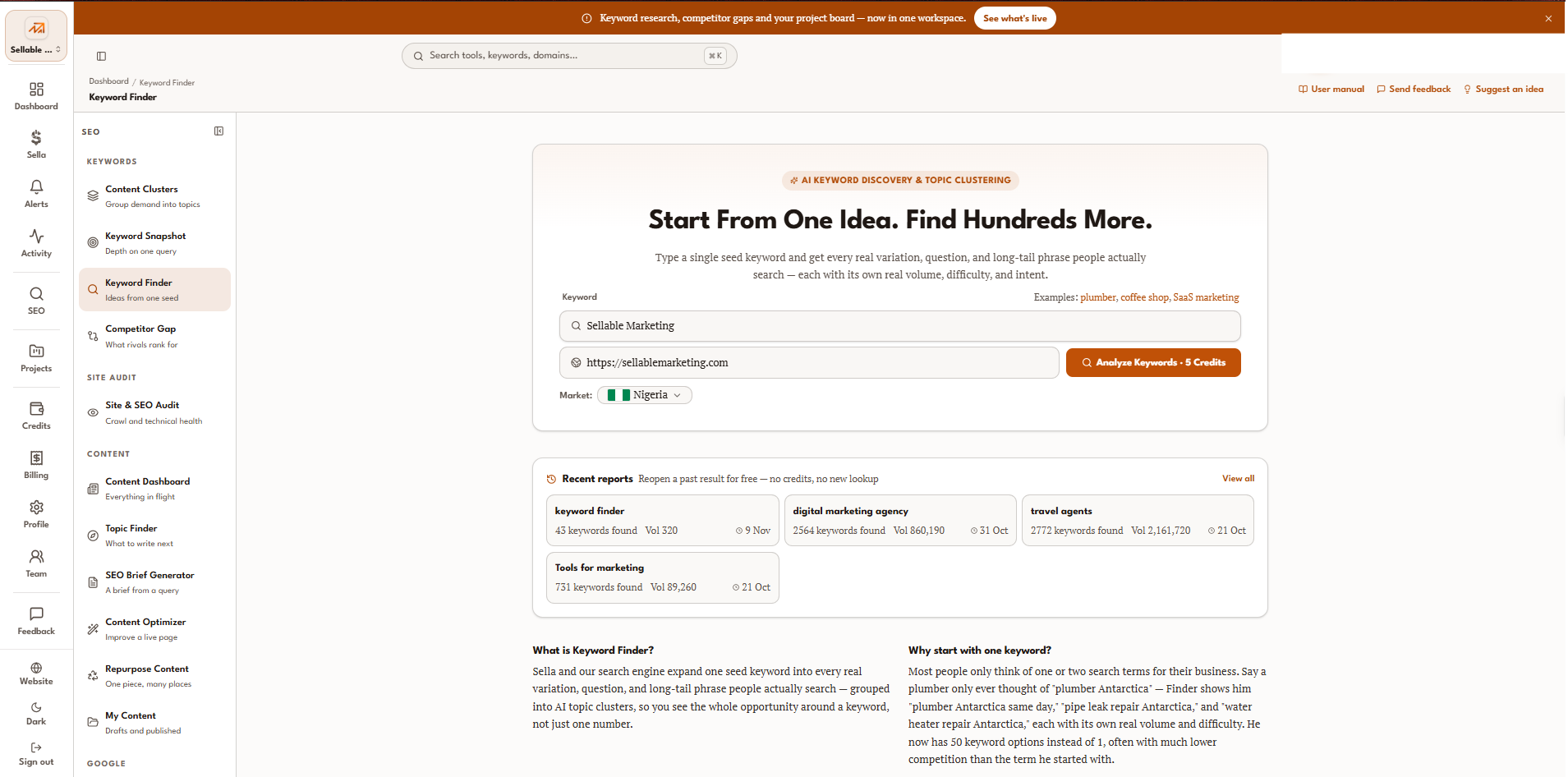
Through the sidebar. Select SEO in the left rail. The panel that opens is grouped into Keywords, Site Audit, Content, and Google. Keyword Finder is the third item under Keywords, labelled "Ideas from one seed". The breadcrumb then reads Dashboard, then Keyword Finder, so you always know where you are.
Through search. Press Command and K, or select the search bar at the top, and type the tool name. The bar searches tools, keywords and domains, so it also takes you straight to a past run.
Opening the tool is free. You arrive on the input screen, not on a charge. Nothing is deducted until you press Analyze Keywords, and that button carries its price.
Check one thing before you type. The credit balance sits in the header next to your name. Five credits is the minimum for a run, and a zero balance will stop you at the last step rather than the first.
How do you run your first search?
Three fields, one of which catches most people out.
Enter one seed keyword
Type the plainest version of what you sell. "Solar company", not "renewable energy solutions provider". Finder expands outward, so a broad seed returns more to work with than a narrow one. The field accepts a single phrase, and the examples beside it show the register it expects: plumber, coffee shop, SaaS marketing.
One seed, one run. If you sell three unrelated things, that is three runs, and 15 credits.
Add your domain
The domain field is optional, and you should use it. Entering your own site turns on the personalised difficulty column, which scores every keyword against your actual authority rather than against the average. Without it, you get the general difficulty score only, and you are left guessing which of those terms are reachable from where you stand.
Set the market
The market selector defaults to United States. If you are selling in Nigeria, change it before you press the button, every single time.
This is the step that wastes credits. A run on the wrong country returns real figures for a real market that is not yours, and nothing on the results page announces the mistake. The results header shows the database you selected, so check it against what you intended before you read a single row.
Then press Analyze Keywords. The button shows the 5-credit price, and the run returns in a few seconds.
How do you read the results?
Start with the summary bar, then the columns, then the filters. Leave the charts until last.
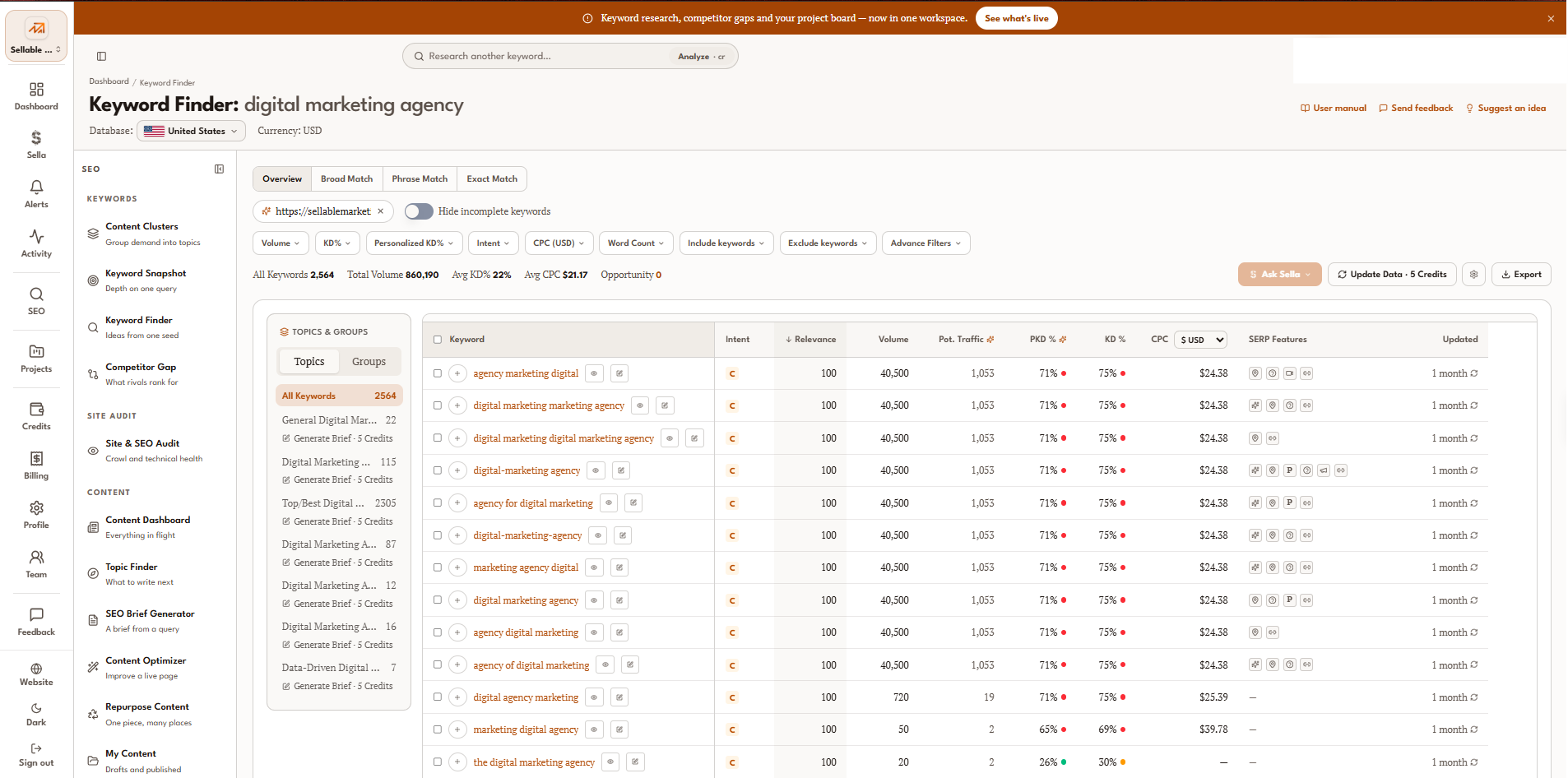
In Sellable Workspace, the summary bar across the top gives the whole run at a glance: how many keywords came back, their total volume, average difficulty, average cost per click, and an Opportunity count. Opportunity is the number of terms the system judges high in volume and low in difficulty. A zero there is a real answer, not a loading state.
| Column | What it tells you |
|---|---|
| Intent | Informational, Commercial, Navigational or Transactional |
| Relevance | How close the keyword sits to your seed |
| Volume | Measured monthly searches in the selected country |
| Pot. Traffic | Clicks you could expect if you ranked, which is modelled rather than measured |
| PKD % | Difficulty personalised to the domain you pinned |
| KD % | General difficulty, 1 to 100 |
| CPC | What advertisers pay per click, switchable between USD and NGN |
| SERP Features | Whether the results page carries an AI Overview, video, images or other blocks |
| Updated | How long ago the figures were measured |
Read PKD and KD together. A term at 33% generally, and 90% for you, is not a term you can win this quarter. A term showing 0% in both is either genuinely open or too thin to score.
The SERP Features column is the one most people ignore and should not. A results page carrying an AI Overview answers the question before anyone clicks, so the volume overstates the traffic available.
The filters and the match tabs
Filtering is free and unlimited. Narrow by volume range, difficulty range, personalised difficulty, intent, cost per click, or word count, and include or exclude words. The "Hide incomplete keywords" toggle removes rows missing figures, which is usually the first thing to switch on.
Four tabs sit above the table. Overview is everything the run returned. Broad Match, Phrase Match and Exact Match tighten how closely a keyword has to resemble your seed. Start on Overview and move to Phrase Match when the set is too loose.
Topics, charts and the assistant
The Topics and Groups panel on the left clusters the run into subtopics, each with its own count and a Generate Brief button at 5 credits. This is the fastest way to see the shape of a market rather than a wall of rows.
The Keyword Landscape chart plots the top eight terms by volume with difficulty overlaid, and the Intent Distribution ring shows the commercial and informational split. Both have a View as table option.
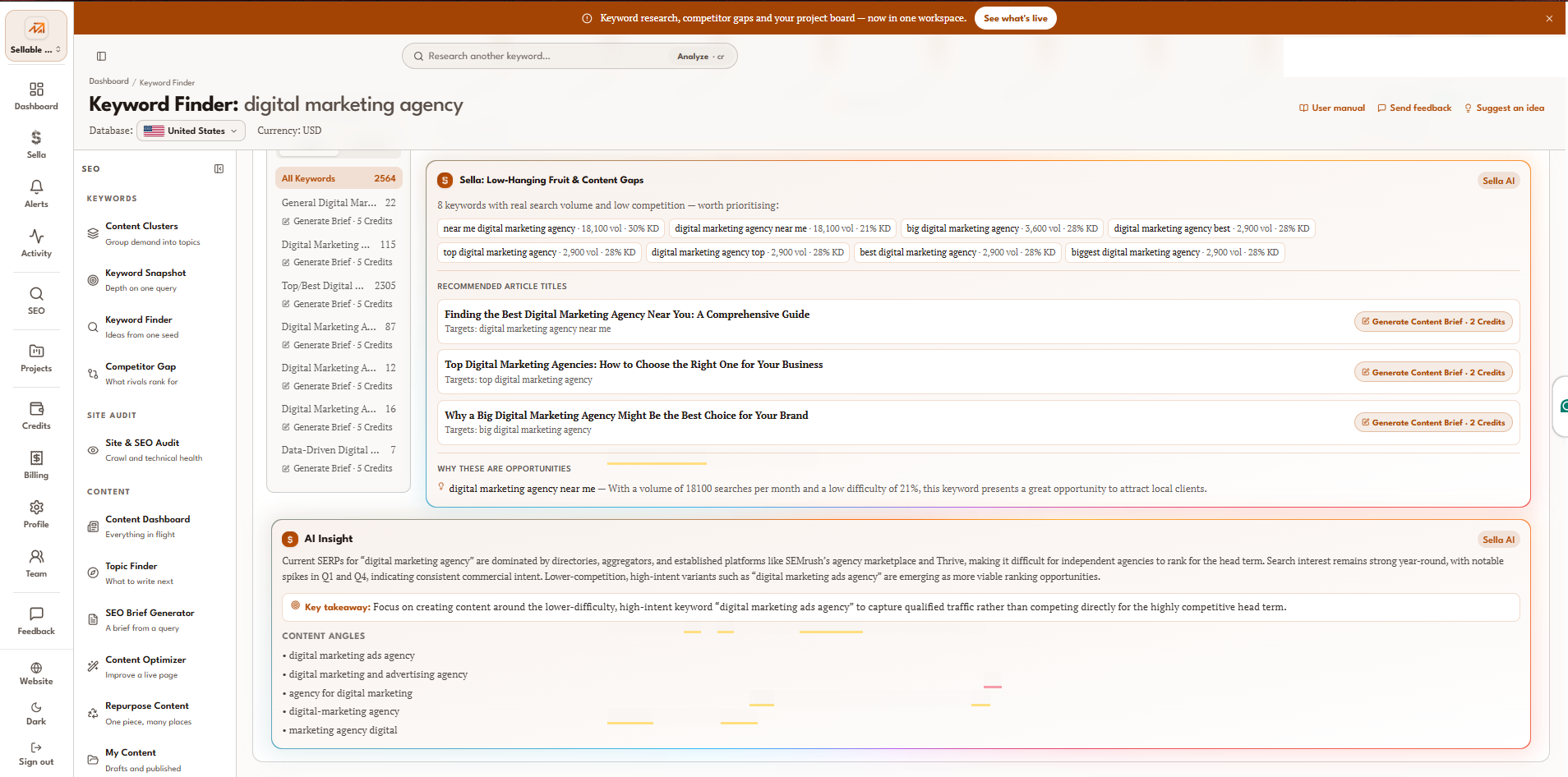
Below them, Sella reports low-hanging fruit and content gaps, and an AI Insight panel summarises what currently ranks and suggests content angles. Treat these as a reading of the data, not as a decision. The decision rule below still applies.
What happens when you click a keyword?
Selecting a keyword in a Sellable Workspace Keyword Finder run opens that single term in Keyword Snapshot. Finder maps a market. Snapshot decides one term.
That hand-off is the second half of the job, and skipping it is how a low difficulty score turns into six months of wasted work. Snapshot shows you the results page behind the term: who ranks, what format they used, and what authority they carry.
There is one rule this house will not bend on. Never trust a difficulty score without pulling the results page.
Here is why, measured. Sellable Workspace measured "keyword research tool" at 170 monthly searches and search difficulty 17 in Nigeria on 9 November 2026, which reads as an easy win. Pulling the results page the same day showed position one held by a tool product page, an AI Overview at position two, and the remaining first-page slots split between tool products and "best free keyword research tools" listicles. Nothing on that page is a guide, and nothing on it is a small site. The 17 was a false signal.
The same check run on the primary term of this article gave the opposite answer. Sellable Workspace measured "how to do keyword research" at 20 monthly searches and search difficulty 12 in Nigeria on 9 November 2026, and the results page returned step-by-step guides at every organic position, with an AI Overview at the top, a video at three and a People Also Ask block at seven. Low volume, but the format matches, which is the condition a guide needs to meet.
So the sequence is Finder for the landscape, Snapshot for the verdict, and the results page for the truth. Three steps, and the third one overrules the other two.
Where do the results go next?
A keyword list is not a plan. Five Sellable Workspace tools turn one into the other, and all of them read from the run you already paid for.
| Tool | What it does with your run | When to use it | URL/link |
|---|---|---|---|
| Keyword Snapshot | Goes deep on one term and shows the results page behind it | Before committing to any keyword | https:// |
| Content Clusters | Groups the run into topics, so one strong page serves many terms | When the run returns more than about thirty keywords | https:// |
| Competitor Gap | Shows what up to three rivals rank for that you do not | When you are starting cold and have no list | https:// |
| SEO Brief Generator | Turns a chosen keyword into a brief with the target and secondary terms | Once a keyword has passed the results-page check | https:// |
| Topic Finder | Suggests what to write after the obvious pages are done | When the first cluster is published | https:// |
Two further destinations matter more than they sound.
Site and SEO Audit. Run it before you publish, not after. A crawl and technical health check tell you whether the domain can rank at all. There is no sense publishing twenty pages onto a site with an indexing problem, and finding out first is far cheaper than finding out later.
Projects and Tasks. This is the step most keyword research never reaches. A finding becomes an assigned piece of work with an owner and a date, on a board in the same workspace as the data that produced it. Research is the cheap part. Content programmes stall because no one ever gets the insight.
Research is the cheap part. Content programmes stall because the insight was never given to anybody, and if that is where it always stalls the real question is who you hire, which is covered in what to look for in an SEO company.
The Export button takes the run out as a file if someone outside the workspace needs it. Everything else is better kept inside, where the next tool can read it without anyone retyping a row.
Three worked examples: solar, real estate, and website design
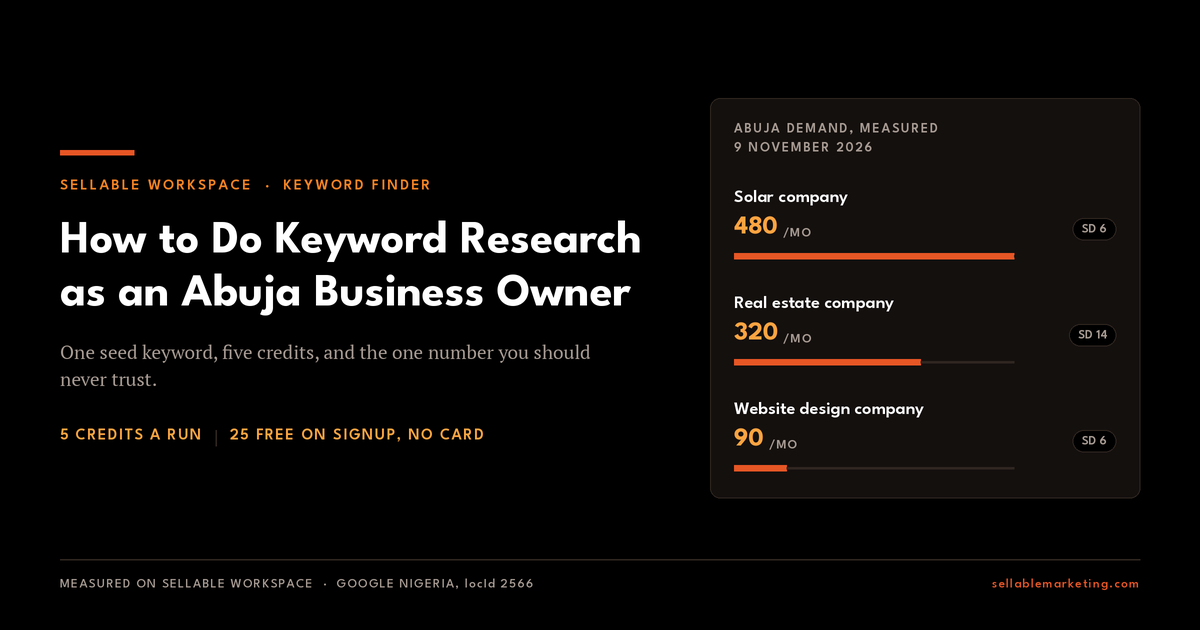
Take three Abuja businesses with a website and no rankings: a solar installer, an estate agency, and a web design studio. One seed keyword each, market set to Nigeria, domain pinned. Three runs, 15 credits.
Here is what the measurement returned.
| Keyword | Monthly searches | Search difficulty | Intent |
|---|---|---|---|
| solar company in abuja | 480 | 6 | Navigational |
| real estate company in abuja | 320 | 14 | Commercial |
| website design company in abuja | 90 | 6 | Commercial |
Measured by Sellable Marketing on Sellable Workspace, 9 November 2026, Google Nigeria, locId 2566, in English. Cite as: Sellable Marketing, Abuja sector demand measurement, 9 November 2026.
Three things fall out of those rows, and none of them is visible from volume alone. First, volume and difficulty do not move together. Solar is the largest of the three and the joint easiest, at 480 searches and difficulty 6, while real estate is smaller and more than twice as hard at 320 and 14. Rank these by size and you pick the right one by luck. Second, the intent column tells you what the page has to do: Sellable Workspace classifies "solar company in abuja" as Navigational, meaning most searchers already have a named company in mind, while "real estate company in abuja" and "website design company in abuja" both return Commercial, meaning they are still comparing. Third, small is not the same as not worth having. Website design at 90 searches a month looks thin beside solar, but at difficulty 6 with Commercial intent it is a term a new site can realistically hold, and ninety people a month actively shopping for a website is a pipeline.
Now apply the rule from the previous section to all three. Difficulty 6 is a score, not a verdict, so the next step is the results page. Clicking each term opens it in Keyword Snapshot. For solar the page returns a local pack, then company homepages, then directories, then sector listicles, one of which sits on a domain with very little authority. A listicle is therefore reachable. A marketing essay is not, because it does not match what the searcher asked for. Run the same check on the other two before committing to either, because a format that works in one Abuja sector does not transfer to the next.
That single check changes the deliverable. Without it the installer writes "Why Solar Is the Future of Nigerian Energy" and ranks for nothing. With it they write the list of solar companies in Abuja, which is what the results page rewards, and they appear on it.
One honest limit. This will not win the three local pack slots at the top, which need a verified business presence in the city rather than an article. Organic is what is on offer here.
And one caution on the opposite case. A term with your city in it is not automatically worth having, and the word you pick for your own trade can matter more than the trade does. Sellable Marketing measured these four on 9 November 2026.
| Keyword | Monthly searches | Search difficulty |
|---|---|---|
| digital marketing agency in abuja | 110 | 22 |
| digital marketing company in abuja | 10 | 5 |
| seo company in abuja | 10 | 5 |
| seo agency in abuja | 0 | 4 |
One noun separates each pair. An Abuja business looking for help searches for a digital marketing agency eleven times more often than a digital marketing company, and for the other pair the direction reverses: an SEO company returns 10 searches a month while an SEO agency returns none at all. Nothing about the service differs. Only the word does. Guessing which one your customers use is how a page ends up serving nobody, and the same run returned "keyword research tool nigeria" at 0. Measure it; do not assume it.
If you are on the other side of that search, choosing an agency rather than being found by one, we have written separately on how to choose a digital marketing agency in Abuja.
Where do you get help, and how do you ask for a feature?
Three routes, and they do different jobs. Picking the right one is the difference between an answer today and a feature next quarter.
The user manual
The User manual link sits in the top right of every tool page, beside Send feedback and Suggest an idea. It is page-specific, so opening it from Keyword Finder gives you Keyword Finder. Start here for "how does this work".
Feedback
Send feedback is for something that is wrong. The form opens with the context already attached: which part of the product you were in, which page, your screen resolution and your browser. You do not have to describe where you were, which is usually the hardest part of a bug report to get right.
| Category | Use it when |
|---|---|
| Report a bug | Something is broken or behaving incorrectly |
| Report incorrect data | A number, metric or result looks wrong |
| Report a usability issue | It works, but it was confusing or hard |
| Share something you like | Something is working well |
| General feedback | Anything else |
"Report incorrect data" is the one to reach for if a volume or difficulty figure looks implausible. Quote the keyword, the country database and the figure you saw.
Your submissions appear under Your feedback with their status, so you can follow what happened rather than wondering.
The ideas board
Suggest an idea is for something that does not exist yet. It goes to a public board where everyone can read it and vote, and the vote count is how the build order gets decided. Ideas carry a state: open for votes, planned, in progress, or shipped.
Write it for other users, not for the team, because they are the ones voting. The first field takes 140 characters and should name the thing itself. The second field asks what you are trying to do and what gets in the way, and that is the one that wins votes.
The short version: manual for how, feedback for broken, ideas for missing.
Your Action Plan
Five steps, about twenty minutes, 5 credits.
Open Keyword Finder in Sellable Workspace from SEO, then Keywords. Change the market from United States to your own country.
Enter the plainest name for your main service as the seed, and pin your domain so the personalised difficulty column fills in.
Press Analyze Keywords. Switch on "Hide incomplete keywords", then sort by volume and read the personalised difficulty column beside it.
Pick the one term with real volume and a difficulty you can reach, and click it. That opens Keyword Snapshot. Look at what currently ranks and in what format.
If the format on that results page is something you can produce, send the keyword to SEO Brief Generator and put the brief on the Projects board with a name and a date against it.
If the run comes back with an Opportunity score of 0, that is useful too. It means this seed is not the way in, and you have found that out for 50p rather than for a quarter of work. Try a different seed, or run Competitor Gap against a rival who is already ranking.
Do not skip step four. A difficulty score is an estimate of the competition. The results page is the competition.
Sellable Workspace
See what your buyers search for and what your rivals are winning, then build a pipeline from both.
Start free with 25 credits → https://www.sellablemarketing.com/signup
Frequently asked questions
How do you do keyword research, step by step?
Start with one plain seed keyword for what you sell and set the country you sell in. Expand it into every real variation with a keyword discovery tool, then filter by measured volume, difficulty and intent. Pick the terms with demand and reachable difficulty, then open the results page behind each one before committing. If the format currently ranking is something you cannot produce, the keyword is not yours, whatever its difficulty score says.
What does one Keyword Finder run cost?
A Keyword Finder run costs 5 credits in Sellable Workspace. Credits cost 10p each, so one run is 50p, and £1 buys ten credits. Credits never expire. A new account receives 25 free credits with no card needed, which covers five runs. Opening the tool is free, reopening a past run is free, and filtering or exporting a completed run is free. Refreshing a run with Update Data costs another 5 credits.
Is there a free keyword finder that is good enough?
A free keyword finder is adequate for checking one term and inadequate for planning a content programme. Most return a volume band such as "100 to 1K" rather than a figure, which covers both a dead term and a quarter of work without distinguishing them. Free tiers also cap daily lookups, rarely carry search difficulty, and do not classify intent. The cost of a strategy built on an unmeasured term is usually higher than the cost of measuring it.
Why does a keyword with low difficulty still not rank?
Because difficulty is an estimate and the results page is the fact. Sellable Marketing measured "keyword research tool" at search difficulty 17 in Nigeria on 9 November 2026, then pulled the results page the same day and found every first-page slot held by tool products and "best free tool" listicles. Two phrasings of one query can also score very differently on an identical page, so always pull the page before committing.
What is the difference between Keyword Finder and Keyword Snapshot?
Keyword Finder expands one seed keyword into hundreds of variations with metrics attached, which maps a market. Keyword Snapshot goes deep on a single query and shows the results page behind it, which decides whether that term earns a page. Clicking any keyword in a Finder run opens it in Snapshot. Use Finder to find candidates and Snapshot to rule them in or out.
Ask Sella anything about this article
NewGet personalised, AI-powered answers built on our team's trusted growth frameworks.
Ask anything about "How to Do Keyword Research as an Abuja Business Owner", or pick a quick action:
Tip: highlight any passage in the article to ask AI about that specific section.